Advanced PC Bottleneck Calculator Pro
Comprehensive system analysis with game-specific recommendations and upgrade suggestions
Analysis Results
Select your components and run the analysis to see detailed performance predictions and bottleneck reports here.
What’s New?
- Game-specific performance analysis
- RAM and storage impact assessment
- Use case scenario optimization
- Upgrade cost-benefit analysis
- Advanced bottleneck detection
- Localized language and currency support
Pro Tips
- Balance CPU and GPU for your target resolution.
- NVMe SSDs improve load times and responsiveness.
- Higher refresh rates increase CPU and GPU demands.
- Content creation benefits from more CPU cores.
- Use the export options to save or share your analysis.
Unleash your PC’s potential with our Bottleneck Calculator
Even with a respectable PC setup, why do your games seem to lag, and why does your computer feel sluggish? You’re not the only one at least one gamer or PC user goes through this every day.
Our bots help you identify the gaps in your setup, like the CPU and the GPU unable to do the same amount of work, and everything in between.
Constructing a new gaming rig? Looking to upgrade and old one? Or, just in the market to learn about your system’s performance? We have the answer for you. Simply enter your specs and receive instant insights for your system’s optimization.
It doesn’t have to be guesswork; you can save your money, time, and multiple unnecessary upgrades by making effective choices to hit great speeds and enhanced gameplay. Explore to learn how your PC’s experience can radically change from perfectly configured hardware.
What is a PC Bottleneck?
If you are to picture your computer system as a football team, then one of the most important aspects of the formation is that all of the players have to be of roughly the same level; for instance, if one of the players is much slower, the rest of the players are going to have a problem, and the entire team will suffer for it.
This, in a nutshell, is a PC bottleneck; a single component that is a lot slower than the rest of the components and, as a result, restricts the overall performance of the system. It is essentially an entire lane of a major traffic motorway which is completely blocked and one wide lane has to filter into one narrow lane, like a bottleneck.
When hardware doesn’t pair correctly, bottlenecks occur. An example would be a dominant graphics card being paired with a far too weak a processor resulting in an imbalance. This imbalance results in lower game frame rates, slow loading, and even crashing mid task. This notion is something all pc users, from casual users to avid gamers, need to be familiar with.
Absorbing Hardware Imbalance
When a processor, graphics card, random access memory, and sometimes even motherboard, work out of sync, imbalance is the result. A way to think of it, is baking a cake. Let’s say there is an excess in flour and little to no eggs, the cake is no longer a cake. Your computer in this case will fail to operate in optimal conditions.
Take gaming for instance. Your hardware would perform to the optimal limits for high demand titles. Any bottlenecks would be detectable via a cpu bottleneck test calculator (for example the cpu gpu bottleneck calculator which will tell you if your cpu is in any way shape or form limiting the capabilities of your gpu).
That’s not just a bunch of words strung together, it’s really about ensuring you get a return on your investment. Too many people purchase pricey parts without ensuring compatibility, only to be met with utter disappointment. You can accurately plan your upgrades by ensuring there are no imbalance factors, which means you will not be wasting any money.
Bottlenecks and Their Kinds
Every type of bottleneck has a distinct impact on a PC. Let’s take a closer look.
We can begin with the CPU bottleneck. This term refers to a bottleneck wherein the processor does not deliver enough data to other components of the PC. In a video game, playing with the lowest settings, and achieving a lower frame rates is common with a CPU bottleneck.
The next type is the GPU bottleneck. This phenomenon occurs when the CPU is idle, and the rest of the components are awaiting the processing of graphics. This is common with outdated graphics cards. This can be solved with a GPU bottleneck calculator.
A ram bottleneck sneaks on you. When the computer is devoid of enough memory, it then proceeds to swap data to a hard drive which results in the slowing down of the system. A ram bottleneck calculator can assist you in determining when you ought to add more ram sticks.
Motherboard bottlenecks, although less common, can still be a reality. A motherboard bottleneck calculator can assist with this.
Slow hard drives, in particular, can greatly increase the time it takes to load a game. This can be solved with an SSD.
Understanding these varied categories can aid you in determining what types of problems you need to fix, in other to avoid the level of frustration that comes with it.
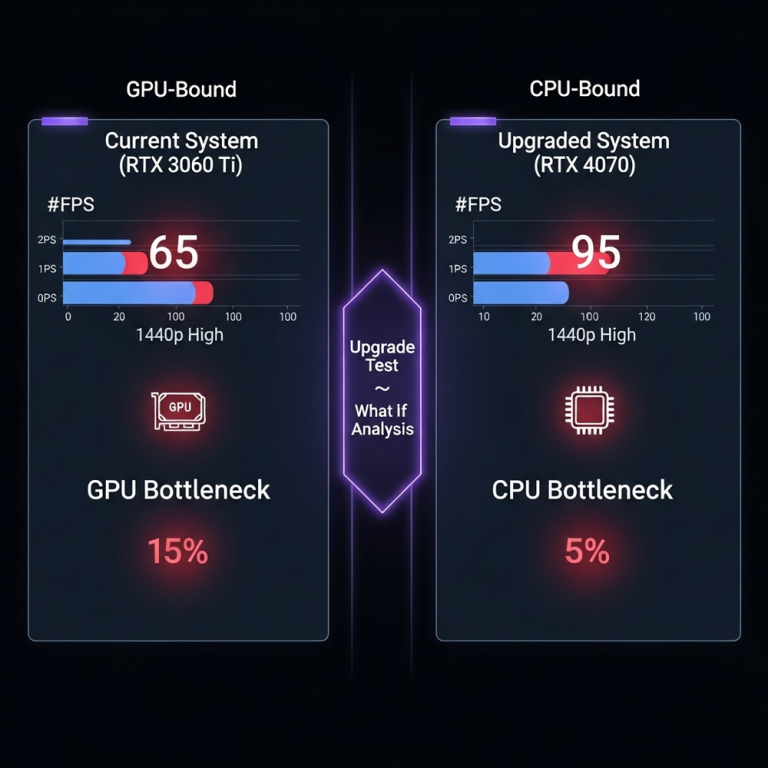
Bottleneck Calculator – Test Your CPU & GPU for Performance Bottlenecks
Why Use a Bottleneck Calculator?
In a sea of technological options, why utilize a tool like this? To put it simply, it’s like having an auto-mechanic for your personal computer. No guesswork, just solutions. Our trusty bottleneck calculator does the heavy lifting, pinpointing the issue and saving you time and money in the process.
On the surface, it provides an easy approach to PC building. There are no requirements for advanced computing skills; all you have to do is fill out the form and you will be educated. Advanced users value the accuracy it offers while adjusting high-tier configurations.
For Gamers
Gamers, have a seat. There is nothing worse in the middle of a fight in a game than frame drops. A gaming bottleneck test pc calculator will hone in on specific issues and guarantee smoother play.
Regardless of whether it is a first-person shooter game or an open-world game, an imbalance will break the focus of the player. A game bottleneck calculator will determine if your hardware is sufficient for the game. For example, in CPU-heavy games, a cpu and gpu bottleneck will determine if your GPU is bottlenecked by your processor.
There is no rational reason to utilize a gaming pc bottleneck calculator after purchasing the hardware. Imagine getting a GPU only to find out your CPU is the reason for the bottleneck.
To PC Builders
If you’re constructing a fresh new PC, you will need a pc build bottleneck calculator. This saves you time and assumes the way components work together and what problems may exist before you spend the time configuring.
A pc builds bottleneck calculator allows you to experiment with a certain number of configurations. Mixing and matching CPUs and GPUs until you get the best performance is half the work. Applications of this type, like pc-builds bottleneck calculator (taking cues from beloved community tools), work like a charm.
When you’re talking about upgrades, a calculator that computes the performance cpu gpu bottleneck ratio, helps to figure out what problems the new components will create. It is all about equilibrium to avoid new problems and maximize performance.
Advantages of recognizing the bottlenecks
You get significant advantages from finding bottlenecks early. First, improved efficiency, there are no more hiccups and the system operates faster.
Secondly, you save more. Unlike before, you won’t be upgrading components blindly. Focus on the weak points instead. Use a computer bottleneck calculator that streamlines the adjustments.
Third, you get to save the hardware. Coolers are more efficient and almost last indefinitely. Balanced systems are more worn out and last longer.
Last, relax. It doesn’t matter what you do with the system, you can be sure that everything is well optimized. You can simply thank all the people that have made a bottleneck pc calculator available to the public.
How Our bottleneck Calculator Works.
Our tool is simple but very effective. It runs sophisticated algorithms that estimate the hardware specs that are plugged against credible benchmarks. It is not magic but simple math that is very intelligent.
Begin by choosing your CPU, GPU, RAM, and the rest of the parts from the drop down menus. The parts are then analyzed, and any potential bottlenecks are calculated and characterized as a percentage.
For accuracy, extensive databases of tested configurations are used. A bottleneck calculator cpu gpu focuses on the interplay of the processor and graphics. The opposite goes for a gpu cpu bottleneck calculator.
We ensure timely updates by adding new hardware regularly to the database. The service is free, quick, and needs no downloads making it very relevant for fast checks.
The Science Behind It
In essence, the calculator estimates and distributes weighted averages of each subsystem. For instance, for the gaming subsystem, it calculates frame rendering; for the rest, it estimates on primary and secondary resource utilization.
Internal, external and peripheral data are then analyzed and processed. A cpu agent bottleneck calculator may use agent-based simulations, but we prefer to keep it simple and effective.
Results are categorized as mild, moderate, and severe bottlenecking on the scales from 10% beyond the processed measure each aggressor of bottleneck spend.
This eases the decision making to come to a conclusion.
Comparing to Other Tools
There are many tools out there, but ours is well regarded as a trusted bottleneck calculator. Most other basic tools focus on a smaller variety of components; we incorporate the motherboard and RAM as well.
Here, the gpu and cpu bottleneck calculator is thorough, and not superficial. We do not store any data to ensure user anonymitiy.
How To Calculate Bottleneck
- Ready to try? Here is a simple step by step process.
- Go to our homepage and look for the calculator widget to get started.
- Fro m the list provided, select the appropriate CPU. If you have any doubts, you can search by the model.
- Next, select the appropriate GPU. The bottleneck calculator for gaming automatically adjusts settings for the focus of the game.
- Input the specs for the RAM, both the amount, and the speed. For more in-depth analysis, motherboard and storage can be added, although it is not required.
- Press the “Calculate” button, and in a few seconds, the results will be provided.
- Examine the report…
- The graphs will identify the bottlenecks, and the suggestions will follow.
- Even children can follow the provided steps, it is that easy!
Customizing your analysis
As a more advanced user, you can adjust settings such as resolution and type of game.
The gaming pc bottleneck calculator option allows you to select particular games for more tailored advice.
If you aren’t using a prebuilt, you can try out the pc build bottleneck calculator to run hypothetical tests.
Interpreting Your Results
If you’ve got your report, let’s try and understand it.
A low bottleneck score (5% or under) constitutes as a balanced setup, meaning the user has done a great job!
Moderate (5-15%) suggests minor tweaks that can be made, such as overclocking.
If the results are over 15%, there is high concern and urgent fixes will need to be done, possibly an upgrade to the bottlenecked part.
Look for specifics…
If using a cpu gpu bottleneck calculator and it shows the CPU is the issue, it would be wise to research faster processors.
Data is represented visually in the graphs, making it easy to understand.
Common Misinterpretations
Do not panic. Small percentages are often negligible in real use.
The results are just estimates, while real world testing (such as benchmarks) will confirm.
As a pc bottleneck calculator, our tool will predict many different outcomes. However, user habits are the most important.
Ways To Understand And Optimize Peak Performance
The process of evaluating the performance of a piece of machinery or equipment revolves around one step.
Improving a bottlenecked processor: Shift to a multi-core/multi-processing system. Optimization of software is an option.
Solutions for the graphics processor: Obtain a more powerful graphics card. Temporarily reduce settings on the game.
Install additional RAM and check that at least one of the channels is configured to dual.
Motherboard: New one unlocks more potential, so long as it is not the one that is limiting.
Updated drivers, as well as dust, and temperature are to the system as light as mop with water surrounded (monitor the system).
The tool is available so that the user can complete the performance bottleneck without having to purchase anything.
Also Read: Bottleneck Calculator – Test Your CPU & GPU for Performance Bottlenecks
Final Thoughts or Summary
In mild cases, mild over-clocking can be helpful, but it must be learnt in a safe way. Ongoing computerisation of the system: Shut down applications that are not in use. Make sure the operating system is up-to-date.
A list of top peripherals for gaming: A ‘gaming bottleneck calculator’ can be of assistance regarding VRAM issues.
Budget your expenses. Save more for parts that are more expensive, and balance with the rest.
Common Questions and Answers
A bottleneck calculator checks the performance of computer components and identifies imbalances. A pc bottleneck calculator indicates which element causes the system to underperform, or, slow down the performance of the entire computer.
Yes. Indexing works as a computer bottleneck calculator. A non-gaming computer can also benefit from this.3. Is the pc bottleneck calculator an accurate approach.
The estimations made by the calculator are not as accurate as the data it uses, but they are still a good estimation. There are practical differences, but it is a good starting point.
4. Do I need to download anything for the cpu gpu bottleneck calculator?
There are no downloads. Go online, input the required specifications and get the results almost instantaneously.
5. How often should I check with a gpu bottleneck calculator?
Check with the calculator when you are upgrading, have the new build with the new features, or are experiencing slowdowns. Gamers should check before the release of a new game as well.
6. Would the ram bottleneck calculator take into consideration speed or just the amount?
It analyses meticulously both the speed and the capacity.
7. What’s the difference between a pc build bottleneck calculator and a regular one?
The pc build bottleneck calculator allows you to test potential configurations, while the regular one is focused on the current ones.
Chapter 9: Conclusion: You are now able to customize and enhance your PC value journey.
Balance in life is essential. Having a balanced PC is not only its power, but its harmony. Whatever the case, bottleneck calculator, whether a general one or gpu cpu bottleneck calculator, puts that power in your hands.
You now understand what bottlenecks are, why these are important, and how to deal with them. Enjoy seamless computing.
No more subpar performance; optimise wisely. Start with our tool today, whether you are gaming, working, or creating. Your perfect setup is ready, so go and experience the difference. Tech evolves, so keep checking back. Happy building.